


Carefully selected by our experts, these deals may earn us a commission when you purchase.

Save 10% off your booking
Expires on December 31st, 2026
Editor's Pick
Up to 15% off end of year stays
Expires on January 27th, 2027
Editor's Pick
Up to 15% off Rome Italy stays
Expires on December 31st, 2026
Up to 30% off Tokyo hotel deals
Expires on December 31st, 2026
Up to 15% off London escapes
Expires on December 31st, 2026
Up to 30% off Paris stays
Expires on December 31st, 2026
Up to 30% off hotels in Gold Coast
Expires on December 31st, 2026
Up to 30% off hotels in Sydney
Expires on December 31st, 2026
✅ Verified Active: All codes and deals have been manually tested at checkout on October 13th, 2026. Verified by Rhonn Palmaria, Deals Researcher.
Book your next trip using a Booking.com promo code
Planning a holiday? Weekend getaway? Last-minute business trip? Before you book your accommodation, grab one of our Booking.com promo codes to save some cash so you’ll have more to spend on the fun stuff – like cocktails by the pool or that restaurant you’ve been eyeing. Whether you’re after a budget motel, a fancy hotel with all the bells and whistles or a cute Airbnb-style rental, Booking.com has millions of properties worldwide.
To help you on your way, the in-house Better Homes and Gardens Deals Team find the latest Booking.com discount codes and promotions, personally test them to make sure they work, and keep this page updated with fresh deals. So you can spend less on accommodation and more on actually enjoying your trip.
How to use your Booking.com promo code
- Choose your code: Click on your preferred deal to reveal the tested promo code.
- Search for accommodation: Head to Booking.com via our link and search for your destination, travel dates and number of guests.
- Select your property: Browse through hotels, apartments or holiday rentals and choose the one that suits your needs.
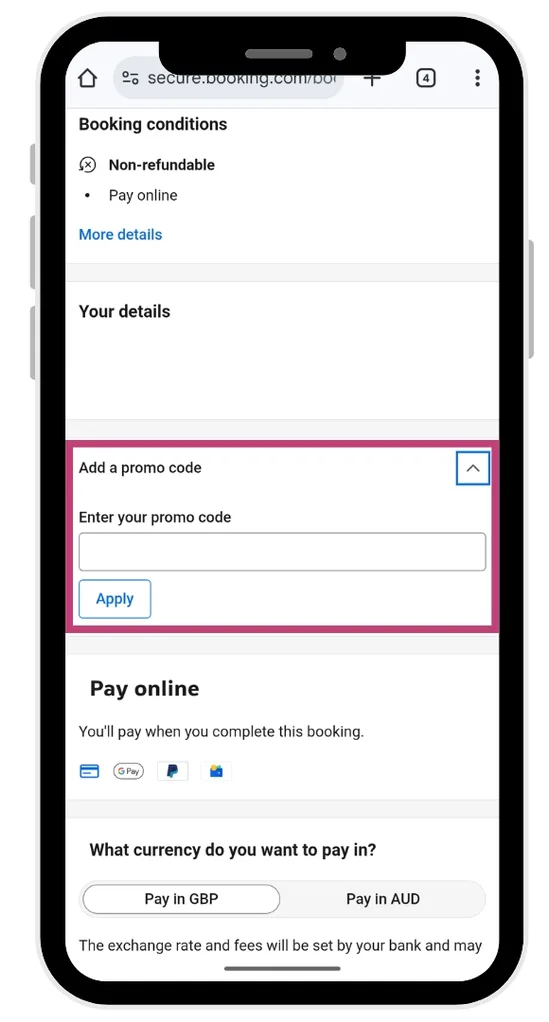
- Apply your code: Choose the accommodation you’d like to book and add in your contact details. On the payment page, you’ll be asked ‘Do you have a promo code?’ Enter your code and click apply. Your discount will be reflected in the total price.
- Complete your booking: Fill in your payment details and finalise your reservation. You’ll receive a confirmation email with all your booking details.
Do Booking.com promo codes expire?
Yes, Booking.com promo codes typically have expiry dates and may be valid only for specific travel dates or property types. Some codes are tied to seasonal promotions or flash sales, while others might last several weeks.
If a code isn’t working, it may have expired, reached its usage limit or not apply to your chosen property. We keep this page updated with working codes and expiry dates where available.
“When I’m hunting for a hotel deal, I always check Booking.com. The free cancellation option on so many properties and hotels means I can lock in a great price months ahead without commitment anxiety. If my plans change – which, let’s be honest, they often do – I can cancel without penalty. It’s perfect for someone like me who wants to feel organised but needs the flexibility to pivot when life happens.“
Delicia Smith, Contributor
Other ways to save at Booking.com
Always capture the best prices and discounts from Booking.com:
- Join Booking.com’s free Genius loyalty program to unlock discounts of 10-20% at participating properties and 10-15% off rental cars. Plus perks like free room upgrades, late checkout and complimentary breakfast as you reach higher membership levels.
- Look for properties offer book now, pay later free cancellation so you can book early and lock in good rates without commitment.
- Filter your search by ‘Deals’ to see properties with special offers and last-minute discounts.
- Book directly through the Booking.com app for exclusive mobile-only deals.
- Sign up for their email newsletter to receive personalised offers based on your search history and preferences.
Booking.com FAQs: Savings, payments, cancellations and more
Does Booking.com have a loyalty program?
Yes. Booking.com Genius is a free three-tier loyalty program. Complete 5 stays within 2 years to reach Genius Level 2 and unlock 10%-15% discounts at participating properties and on car rentals.
Level 3 (15 stays) offers even bigger accommodation discounts of up to 20%, plus perks like free breakfast, room upgrades and flexible cancellation. Genius benefits vary by property, so check which perks are available when you search.
When does Booking.com have sales?
Booking.com runs promotions year-round, with bigger sales during major travel booking periods like Black Friday, Cyber Monday, Boxing Day and January (great for travel planning after summer holidays). For example, the BHG team have even seen discounts of up to 20% during previous Afterpay Day sales!
There are also flash sales and last-minute deals throughout the year. Sign up to the newsletter and check the ‘Offers’ and ‘Deals’ sections regularly to catch limited-time offers. Genius members get access to exclusive discounts that non-members don’t see.
What payment methods does Booking.com accept?
Booking.com accepts major credit and debit cards including Visa, Mastercard and American Express. They also accept PayPal, Apple Pay, Google Pay and various local payment methods depending on your location. Some properties require prepayment when you book, while others let you pay at the property. Payment requirements are shown clearly during booking.
Can I modify my Booking.com reservation?
This depends on the property’s policy and the rate you booked. Many properties allow modifications to dates or guest numbers, but some rates (especially discounted or non-refundable ones) don’t permit changes. You can request modifications through your Booking.com account under ‘Manage Booking’ or by contacting the property directly. Some changes may result in price differences or fees.
Does Booking.com charge booking fees?
Booking.com doesn’t charge guests a booking fee for most reservations – the price you see is the price you pay (including taxes). However, some properties may charge resort fees, city taxes or other local charges that aren’t included in the booking price. These additional charges are usually payable directly to the property and will be clearly stated during booking.
What is Booking.com’s cancellation policy?
Cancellation policies vary by property – some offer free cancellation up to 24-48 hours before check-in, while others are non-refundable. Always check the cancellation terms before booking, as they’re clearly displayed during the reservation process and in your confirmation email. Properties with flexible cancellation usually cost slightly more but give you peace of mind if plans change. If you cancel a booking made with a promo code, you won’t get the code back to reuse.
Can I book accommodation for someone else?
Yes, you can book accommodation for someone else using your Booking.com account. During the booking process, you’ll have the option to enter the guest’s name and contact details. Make sure the property allows this and that the guest will have the booking confirmation and required identification for check-in.
How do I know if a property is highly rated?
Booking.com uses guest reviews and ratings to help you choose. Properties are scored out of 10 based on verified guest reviews covering cleanliness, comfort, location, facilities, staff and value for money. Look for properties with scores of 8+ for quality stays. You can filter search results by guest rating to find top-rated options quickly.
Are Booking.com reviews legit?
Yes, Booking.com only allows verified guests who’ve actually stayed at a property to leave reviews. You can only review after your stay is complete, and you need a confirmed booking through their platform. This means you’re reading genuine feedback from real travellers, not fake reviews. Look for properties with lots of recent reviews for the most accurate picture of what to expect.
What else can I book at Booking.com?
Beyond hotels, Booking.com lets you book holiday homes, apartments, hostels, bed and breakfasts, and even unique stays like houseboats or castles. You can also book flights, car rentals, airport taxis and attraction tickets all in one place. It’s basically a one-stop shop for your entire trip, which is handy when you’re juggling multiple bookings.
Will Booking.com price match?
Yes, Booking.com will price match. You can claim a refund for the difference if you find the exact same accommodation for less on another website after making a reservation through Booking.com. According to the terms and conditions, you can request a price match via phone or email after booking and at least 24 hours before your check-in date. You’ll need to provide the link to the other offer and it must be online and available when the Booking.com team checks.
Why we love Booking.com
Booking.com makes finding accommodation easy with millions of properties across the globe – from budget getaways to luxury resorts and everything in between. What really sets them apart is the transparency: genuine guest reviews, clear pricing (no hidden booking fees for most properties) and flexible cancellation options on many listings. Their Genius loyalty program is actually worth joining, unlike some that promise perks but deliver nothing. We also love that you can filter searches by pretty much anything – free WiFi, pet-friendly, breakfast included, swimming pool – so you’re not wasting time scrolling through places that don’t tick your boxes.
