

If your Dyson vacuum keeps cutting in and out, it might not be broken at all.
Thousands of people discovered this after a cleaning influencer shared a simple fix — and many say it saved them from throwing their stick vacuum away.
Why your Dyson keeps turning on and off
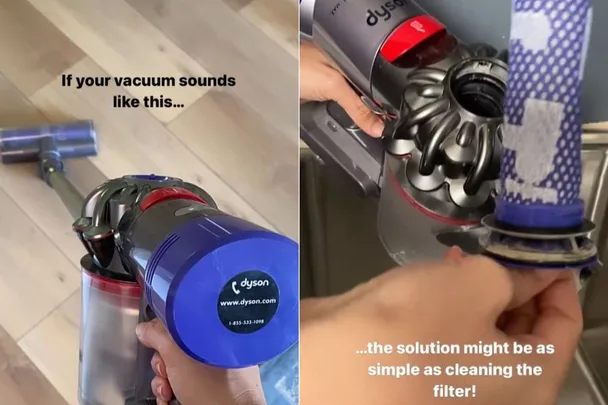
Kait @acleanbee posted on Instagram about the importance of cleaning Dyson filters. “If your vacuum sounds like this … the solution might be as simple as cleaning the filter,” she says. The sound Kait is referring to is the Dyson vacuum turning on and off repeatedly while you’re using it.
Even though your vacuum does the cleaning, its filter still needs regular washing, and many people don’t realise this until performance drops. The video has been liked over 9,000 times, with many viewers reporting that they thought their vacuum was broken.
“We were about to throw our Dyson OUT! Cleaned the top filter, and boom, it works as new,” one person wrote.
Another added: “This is so helpful. My Dyson has been doing this frequently lately. Thank you for sharing!”
“I had the same problem. I don’t know why, but I decided to wash that filter, and it worked fine. Been doing it ever since,” revealed another.
Why you need to clean your Dyson’s filter
When particles collected by your vacuum build up in the filter, they block the appliance’s airflow. Dyson’s website says, “The filter captures microscopic dust, which can accumulate and affect performance.”
The quick fix: how to clean a Dyson filter
• Remove the filter from your vacuum
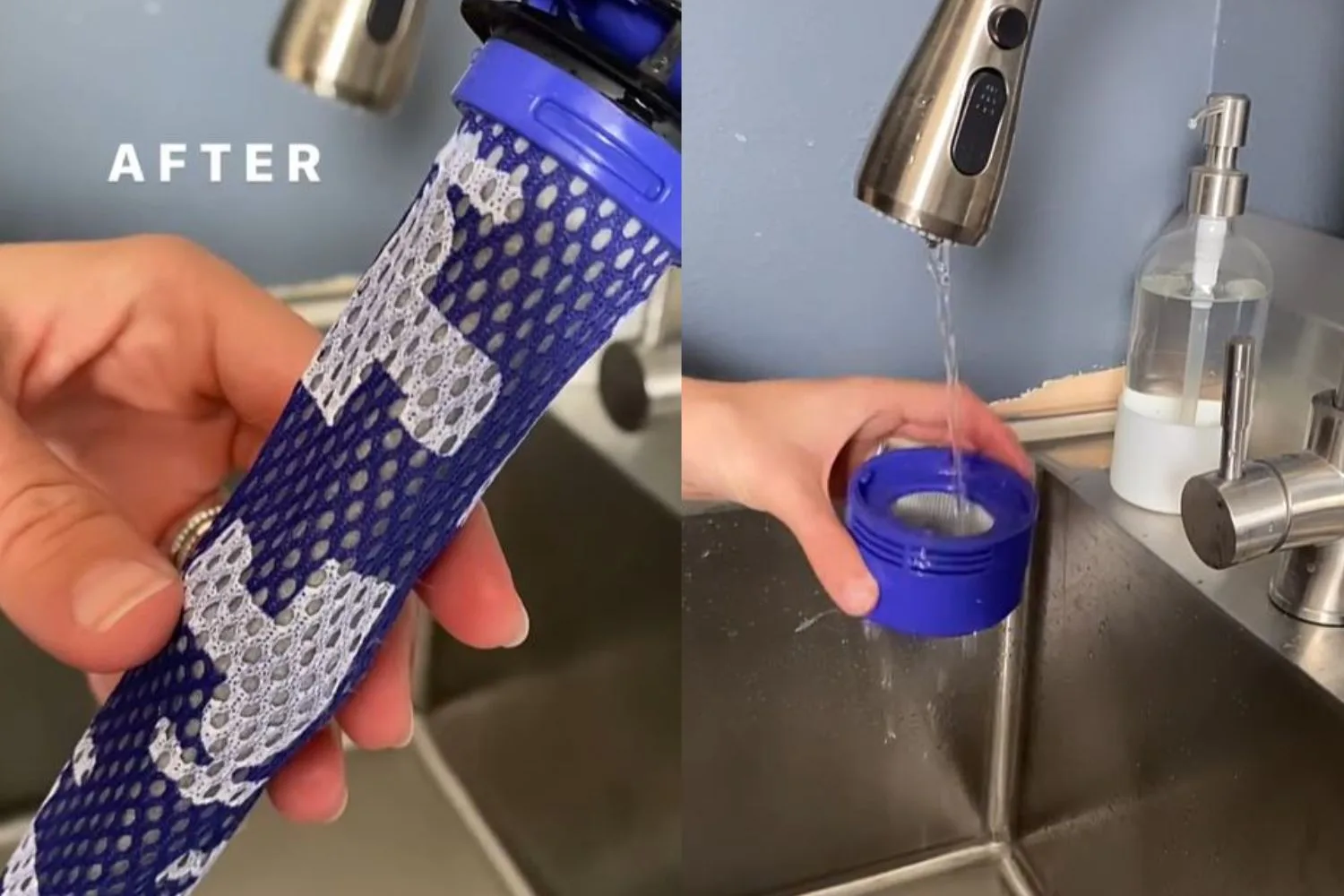
• Rinse under cold running water (no detergent)
• Gently squeeze out excess water
• Let dry for at least 24 hours
• Reinsert once completely dry
3 signs that you need to clean your Dyson filter
- The vacuum is turning on and off quickly as you’re trying to use it
- You’ve noticed suction has decreased
- Some Dyson models have a light that indicates the filter needs cleaning. Check your product’s user manual or the troubleshooting section of Dyson’s website to determine whether the filter is the issue.
How often should you clean a Dyson filter?
Dyson recommends cleaning your filters once a month.
“Help maintain suction by washing the filter at least once a month, or more frequently if used heavily,” Dyson states.

How to clean Dyson filters in your vacuum cleaner
While the filters may vary by Dyson vacuum model, you can typically follow these steps to clean them.
1. Take out the Dyson filters
Remove filter A from the top of the vacuum and twist off the second filter at the back of your Dyson machine.
2. Eliminate excess dust
Lightly tap the filters to dislodge any loose dust or debris.
3. Clean the top filter
Remove the long purple filter from the top of your machine. Hold it under running water and gently squeeze it until it clears. Squeeze and twist the filter to remove excess water.
4. Clean the back filter
Another filter is located at the back of the vacuum. Remove and run under cold water, repeating until the water runs clear. Shake the filter vigorously until no water remains.
5. Allow filters to dry for 24+ hours
Place the filters in a well-ventilated, warm space for at least 24 hours to ensure they are completely dry. To prevent motor damage, the filters must be thoroughly dry before reinserting them into the machine.
6. Reattach the filters
Push the first filter back into the top of the machine. Screw the second filter clockwise onto the back of your Dyson machine.
If you need more assistance, step-by-step instructions with images are available on the Dyson website.
How often should you replace your Dyson filter?
While Dyson doesn’t provide specific guidance on how often to replace vacuum cleaner filters, some Reddit users report that replacing the filter at least once a year improves airflow and suction.
If you use your machine less frequently, you may not need to replace it as often. Obvious signs of wear to the filter include fraying, fading and visible holes. Other users report keeping an extra filter on hand to use when the other one is in the wash (or drying).


